Locality, Cache Lines & Contention
Intro
When we tend to think about memory in systems before we dive into it we usually assume it is a simple arena full of memory we declare an array and our computer goes and allocates some memory from us there and when we access it our computer just sends us that piece, but in reality it isn’t that simple.
Modern computers tend to run on a proper memory system with a hierarchy of storage devices each with different roles, our computer tends to move data around these hierarchy many times. Its great to know about it because a programmer this really affects the performance of your code, if you know where the data is getting accessed from, if the data your program needs are stored in a CPU register, then they can be accessed in 1 cycle during the execution of code, if in a cache, 4 to 75 cycles depending on L1/L2/L3 Cache, if in main memory, hundreds of cycles. And if stored in disk, tens of millions of cycles.
In this deep dive, we will peel back the abstraction layers. We will explore the physical differences in memory tech, understand why "Cache Lines" dictate performance, and look at how writing "Cache Friendly" code impacts performance first in single-threaded apps, and then in the chaos of multithreaded contention.
Memory Technologies
Before we dive into localities and cache let’s dive into some memory technologies that we should know about to understand the latter two better.
RAM (Volatile Memory)
This is the memory in which data stored is gone after the power is turned off.
SRAM (Static Random Access Memory)
SRAM stores each bit of data in a bistable memory cell (special type of cell from some electronic circuit stuff). This cell has a property that allows the data to be retained indefinitely as long as it is kept powered, even with disturbances, the circuit allows it to return to a stable condition. SRAM is much much faster because of the same reason. It is more expensive in terms of money which is why it is used in small amounts right next to the processor for cache memory.
DRAM (Dynamic Random Access Memory)
DRAM stores each bit as a charge on capacitor. Unlike SRAM, DRAM capacitors are leaky. They lose their charge naturally over time. Unless the system constantly 'refreshes' them, the data fades away. DRAM is used for main memory, it is less expensive in terms of money but is more expensive in terms of compute. Stored data here is temporary data used by the computer to do processes.
ROM (Non-Volatile Memory)
In non-volatile memory, the data is retained whether they are powered off or not. They are usually called Read Only Memories. A type of non volatile memory is flash memory, these are the mostly used tech for storing data that has to be retained this is the most used one for SSD that is used in most devices like laptops phones etc.
example workflow: when you download an image, it is first copied to the main memory i.e DRAM of your computer it is then saved into the SSD of your computer from the main memory for permanent storage.
Localities
The tendency to access data items near the data items that were accessed before is called the principle of locality. In simple terms if you buy something from a shop you are likely to buy something from there or from shops nearby again, this is the principle of locality and good programs tend to exhibit this principle i.e. good locality. We should know about these because programs with good locality tend to be faster than programs with bad locality.
Locality is classified into two types :
Temporal Locality
When a memory location that is accessed once is expected to be accessed multiple times again in future that program is said to have good temporal locality.
Spatial Locality
When a memory location that is accessed once and the locations nearby that memory is expected to be accessed times again in future that program is said to have good spatial locality.
Usages in modern computers
Everything in modern computers, from the hardware, to operating systems, to application programs, are built in the correct way to use locality.
In hardware, the principle of locality allows computers to speed up access to the main memory by using small fast memories called cache memories that hold all the most recent accessed data, this is done by the CPU chips automatically. In operating systems, the RAM or main memory speeds up access to the SSD by acting as its cache, how much and how it is done is decided by the os devs. In browsers temporal locality is used for caching recently accessed websites by saving that cache to the frontend local disk to satisfy requests for these documents without requiring any intervention from the server.
Examples Of Locality With Some Small Code Snippets
Example 1: Sequential:
int sumvec(int v[N])
{
int i, sum = 0;
for (i = 0; i < N; i++)
    sum += v[i];
return sum;
}
In this the access pattern in completely sequential which means every element accessed hits good spatial locality. This is a very common method to maintain good locality in general in programs and is know as the stride-1 pattern.
Example 2:
int summatrix(const int mat[M][N])
{
    int i, j, sum = 0;
    for (i = 0; i < M; i++) {
        for (j = 0; j < N; j++) {
            sum += mat[i][j];
        }
    }
    return sum;
}
In this program too reflects good spatial locality as first every element is accessed row wise which is how 2D arrays are allocated in memory.
Example 3:
int summatrix(const int mat[M][N])
{
    int i, j, sum = 0;
    for (int j = 0; j < N; j++) {
        for (int i = 0; i < M; i++) {
            sum += mat[i][j];
        }
    }
    return sum;
}
Now here with just a single change in how elements are accessed column wise instead of row wise ends up the program with poor spatial and temporal locality.
Cache
Now Cache Memories is what Localities are used to build, the principle of locality allows computers to speed up access to the main memory by using small fast memories called cache memories that hold all the most recent accessed data.
Cache Lines
Now we know Cache exists, let’s see how it stores the data. The cache isn’t like a byte by byte bucket. It is organised into Cache lines. How these work is that Data is typically transferred between RAM AND Cache in chunks of 64 bytes (this article assumes a typical modern x86 CPU with 64-byte lines). Now if you read a single int from the RAM the CPU drags that entire 64 byte chunk that had the int and the other 60 bytes in it into the Cache. This is why our example 2 is faster we ask to read mat[i][0] it brings the 64 byte chunk including the next elements of the rows with it and this allows faster access as we hit cache memory instead of the RAM directly but for example 3, we access the RAM most of times because every next step we don’t use the cache.
Cache Eviction
So now we saw that when we read one int, the cpu brings in a whole Cache Line containing neighbours, now what if we don’t use those neighbours immediately? Your Cache is tiny, it can hold few hundred cache lines at once. When the cache is full and requests a new line from the RAM the CPU has to kick out an old line to make room for the new one This is called Cache Eviction. This is exactly what causes the slowness of program in example 3 because in that program cycle of constantly loading and evicting data is happening because we aren’t using it fast enough, this is called cache thrashing. Now these won’t affect the small data like if 4 X 4 is there u won’t face any slowness either way but for bigger data for example in a 1024 X 1024 Matrix column wise access will be slow by quite a lot and in software we do often deal with large amount of data.
Writing good Single Threaded Cache Code
The goal here is spatial locality. You want to use every byte of that 64-byte line you just paid to fetch.
Hardware Prefetcher
Modern CPUs are smart. If they see you accessing i, i+1, i+2, they predict you will want i+3 next. They silently fetch the next cache line before your code even asks for it. So here writing right type of program becomes important for example using linear arrays and stride-1 loops over linked lists and hashmaps which are pointer chasing jumps around the memory completely breaks the prefetcher and can lead to slow programs.
Cache Blocking:
Example With Matrix Multiplication : Let’s say If you do a C = A X B, you will inevitably scan an element of row of A then one from Column of B, now by the time you finish scanning a row of A, the beginning of that row might have been evicted from the cache to make room for new data. When you need it again for the next calculation, you get a Cache Miss. And the cycle continues you keep loading new chunks of A and new chunks of B if the matrix are large.
Solution :
We fix this by changing the order of loops. We refuse to process the whole long row at once. Instead, we break the matrix into small blocks that fit perfectly inside the cache. So Instead of calculating the entire dot product for C[0][0] in one go, we calculate a partial result for a tiny 2x2 square of the matrix. We load just A[0][0], A[0][1] and A[1][0] A[1][1] into the cache. (A tiny 2x2 square). We do all possible math involving these tiny squares. Because the blocks are small, they typically remain resident during this process. We get near-100% cache hits in practice. Only after we finish all math for this block do we move to the next block.
Slower
// 3 Loops: Simple, but destroys cache
for (int i = 0; i < N; i++) {           // Row A
    for (int j = 0; j < N; j++) {       // Col B
        for (int k = 0; k < N; k++) {   // Scan across
            C[i][j] += A[i][k] * B[k][j];
        }
    }
}
Faster (Cache Blocking)
int blockSize = 16; // Example size (hardware-dependent, typically fits in L1)
for (int i = 0; i < N; i += blockSize) {
    for (int j = 0; j < N; j += blockSize) {
        for (int k = 0; k < N; k += blockSize) {

            // Now perform multiplication on just this tiny block
            // This small inner loop runs entirely in L1 Cache!
            for (int ii = i; ii < i + blockSize; ii++) {
                for (int jj = j; jj < j + blockSize; jj++) {
                    for (int kk = k; kk < k + blockSize; kk++) {
                        C[ii][jj] += A[ii][kk] * B[kk][jj];
                    }
                }
            }

        }
    }
}
So basically Good single-threaded code respects the size of the cache and tries to do most its work from within that.
This works great for a single CPU core. But modern CPUs aren't just one core anymore. They are complex factories with multiple cores, private caches, and shared memories. To understand what happens when multiple threads try to touch this memory at once, we first need to understand the L1, L2, and L3 Cache Hierarchy.
L1 / L2 / L3 Cache
We said earlier cache is faster to access that RAM, but modern CPU’s don’t have just one big block of cache. They have a tiered hierarchy designed to filter data closer and closer to the CPU,
L1 Cache
This is the closest memory to the CPU core, it is tiny but instant, data from here can be grabbed in 4-5 cycles(approx 1 nanosecond), it is split into two parts L1i for instructions/code and L1d for data that is stored. L1 is private, Core 1’s L1 cannot see inside Core 2’s L1. They are completely separate.
L2 Cache
If the data isn’t on the L1 the CPU then checks the L2, this is bigger than the L1, this is used when data isn’t small enough to be stored in L1, its speed is 10-15 cycles(3 - 5 nanoseconds). Just like L1, L2 is also private to its core.
L3 Cache
This is the last line of defense before we have to go to the RAM, the L3 shared by all the cores, it is much bigger and usually takes approx of 40-70 cycles for data to be accessed(10-20 nanoseconds), most of the time L3 is the place where in multithreaded programming your threads exchange the data in between themselves.
Now that we understand the hierarchy, let's see how this plays out when multiple cores fight for the same resources.
Multithreading & Contention
In multithreaded programming, cache becomes significantly harder to manage, mainly because L1 and L2 caches are private.
If thread A (on core 1) reads variable x, pulls x into its private L1 cache, if thread B (on core 2) reads same variable x, it pulls x into its private L1 cache Now we have two copies of x. What happens if Thread A changes x to 5? Core 2 is still holding the old value of x. The system is now inconsistent.
To fix this, hardware uses a protocol called MESI (Modified, Exclusive, Shared, Invalid) to ensure coherency.
When Core 1 writes to a line, it broadcasts a message that it is modifying this line, core 2 hears this and must immediately mark its copy as invalid. If Core 2 wants to read the data again, it cannot use its cache, it must request ownership of the cache line via the cache-coherency protocol, which may involve invalidation and data transfer between cores.
Contention
Now all this that is happening, the physical time cost of this coordination is Contention, when threads fight over data they aren't just waiting for a software lock (like a Mutex). They are waiting for electrical signals to travel across the motherboard to invalidate caches, flush buffers, and reload data. This turns a 4-cycle operation into a 300-cycle stall. There are two main types of contention :
True Sharing
When multiple threads are trying to fight to write to the exact same variable. Example : Core 1 takes the cache line, updates it, and invalidates Core 2. Core 2 wakes up, demands the line back, updates it, and invalidates Core 1. The cache line bounces between cores like a ping-pong ball. This destroys scalability.
Fix: We would need to first make sure when multiple threads come to change the same data at the same time we handle that safely for that we use mutexes, spinlock, atomic CAS etc. True sharing cannot be eliminated if threads must mutate the same data, but it can be reduced via architectural decisions.
False Sharing
Let’s say we have two variables, ThreadA_counter and ThreadB_counter.
ThreadA only touches ThreadA_Counter and ThreadB only touches ThreadB_Counter, but because of spatial locality, the compiler stored these integers right next to each other. The sit on the same 64 byte Cache Line. Now when Thread A updates its counter, the hardware marks the whole line as modified. This invalidates the line in Thread B's cache, even though Thread B cares about a different variable.
Fix: To fix False Sharing, we must force the variables onto different cache lines. We do this by adding "padding" (empty bytes) between them.
This follow code is an example when false sharing happen u declare both the variable one after another, the compiler generally puts them right next to each other in memory.
struct WorkerStats {
long jobs_done_thread_1;
long jobs_done_thread_2;
};
Now here we use alignas to add a padding of 64 bytes around these two variables and that makes sure that whenever are they are called into cache of their respective threads from main memory they are very likely to land on separate cache lines.
struct WorkerStats {
 alignas(64) long jobs_done_thread_1;
 alignas(64) long jobs_done_thread_2;
  }
Let's look at a practical example for True Sharing how we avoid it in this scenario: a system where multiple producers generate data for multiple consumers.
Approach 1 : Global Queue (High Contention)
If you use a single central queue protected by a Mutex (or even a lock-free CAS loop), every single thread fights for the same memory address. Whether you are pushing or popping, the CPU cores are forced to play 'ping-pong' with that cache line. The more threads you add, the slower it gets.
Approach 2 : Distributed Queues (Low Contention)
The Consumer Side (Front) : only one thread touches it to pop from it, but the cache line stays hot in worker’s Core’s L1 cache forever.
The Producer Side (Rear) : Multiple threads might push to it, but by spreading the load across 8 or 16 different queues, we drastically reduce the chance of a collision.
Benchmark Details:
This image clearly shows how the distributed queue is faster and has better throughput:
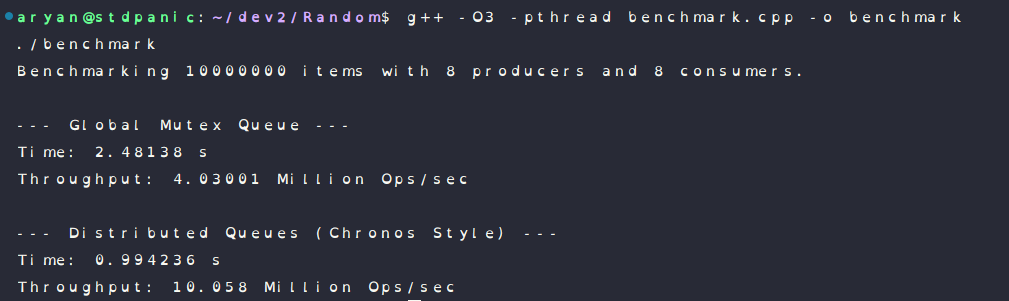
You might think adding more queues makes the system complex and slow. But here, Isolation is Speed. The less your threads talk to each other, the faster they run.
Alright — I have tried my best to explain everything that was discussed in this so far, I hope you were able to somewhat understand this stuff.
I learnt about most of this stuff while building my last project Chronos, which is a low latency job scheduler built in c++, it can give u a bit of an idea if you wish to look at the code of it as well, check it out :
ChronosGracias.