Node.js Internals: Understanding V8 and Libuv
Prerequisites:This article assumes you are comfortable with async/await, callbacks, and basic event loop behavior.
Intro
Node.js relies on two critical components: Libuv for asynchronous I/O and V8 for execution. This blog breaks down the internal architecture of both, explaining exactly how the Event Loop manages concurrency and how V8 uses Hidden Classes to maximize memory performance and a few more V8 optimizations.
What We Will Discuss
- Node js Overview
- How Javascript Works: Call Stack & Event Loop
- V8 Engine & Some Optimizations
Node.Js Overview
Node.js is a runtime that allows us to execute JS outside the browser's domain. Node.js is composed of few dependencies like V8 , libuv , http-parser c-ares etc .
With that said, we can split Node.js into mainly two parts: V8 and Libuv. V8 is mostly written in C++ and some JavaScript, while Libuv is almost completely written in C. If You look at the Node.js source code you will see 2 main folders lib and src.
The /lib folder
This is the one that has all the Javascript definitions of all the functions and modules we require into our projects.This is basically the high level API.
The /src folder
This is the c++ implementations that comes along with them , this is where libuv and v8 reside , where all the implementations for modules like fs , http , crypto and others end up residing.
Node.js Use C++ bindings to glue these two libraries together and run the JS code , When we run a JS function from lib(like fs.readfile), it calls the corresponding C/C++ function in src to perform the actual OS-level work.
How Javascript Works
Since Javascript is the highest level working component of Node.js let's see an overview of how it runs the code under the hood. Let's start with the Javascript Engine. V8 is the most used and most popular javascript Engine out there mostly because it is the engine of chrome and most used browsers are generally chrome and chromium based.
The V8 consists of mainly 2 things i.e.
- Memory Heap: This is where all the memory allocation happens.
- Call Stack: This is where are code gets framed and put in a order to get executed.
Separate Section on the V8 later on in the blog. Most APIs we use are provided by the engine itself. However, some APIs we use are not provided by the engine, like setTimeout, any sort of DOM manipulation etc. These APIs are provided by the browser or in case of your code running on the server by the runtime and are called Web APIs or External APIs.
Call Stack
Call stack is an execution model implemented using a stack data structure. Since we will talk about Call Stack and the single threaded nature of JavaScript and how node.js allows it to be asynchronous let's clear our understanding of the Data Structure called Stack.
A stack is an abstract data type that stores elements in a specific order. Elements are added and removed only from the top, similar to boxes stacked on each other. It has two main operations:
- Push: adds an element to the top.
- Pop: removes and returns the most recently added element.
Stacks follow the LIFO (Last In, First Out) principle, meaning the last element added is the first one removed. Call Stack is where our code gets framed and put in order to be executed. The call stack records the position we are currently executing in our program. If we step into a function, calling it, we put that call on the top of the stack. After we return from a function, we pop the top of the call stack. Each of these calls is called a Stack Frame. A stack frame contains function params , local variables and return address.
Example Code Walkthrough:
function addition (x, y)
{    return x + y}
function printaddition (x , y)
{    const s = addition (x, y)
  console.log(s)
  }
printaddition(5, 3)- Step 0: is the empty call stack, which means the very beginning of our program.
- Step 1: we add the first function call. The call to printaddition(5 , 3) it gets added to the call stack.
- Step 2: the addition function inside the printaddition is then called and added to the top of the call stack. Later, we step into addition, no function calls, nothing is added to the call stack. We only evaluate x + y and return it. Returning means the function has finished running, so we can pop it off the call stack.
- Step 3: we no longer have the stack frame referencing addition (x, y). So now let's go on to the line just after the last line we evaluated, it's the console.log line. console.log is a function call, gets added to the top of the stack. After console.log(s) runs, we can pop it off the call stack.
- Step 4: we now only have a single call stack frame: printaddition(5 ,3), which was the first we added , Since this is the first function call, and there's no other code after it, this means the function is done. It gets popped off the call stack.
- Step 5: is equal to step 0, an empty call stack.
Stacks are exactly how stack traces are constructed when an exception is thrown. A stack trace is basically the printed out state of the call stack when the exception happened. Also stack overflow error happens when we reach the maximum call stack size. Stacks are data structures, which means they're allocated in memory, and memory is not infinite, so this can happen rather easily, specially on non-sanitized recursive functions.
function func () {
  return func()
}
func()
At every call of a func we'll pile up func in the stack, but, as we saw, we can never remove an item from the stack before it has reached the end of its execution, in other words, when the code reaches a point where no functions are called. So our stack would be blown because we have no termination condition.
Asynchronous Work
So far everything we discussed happens inside the call stack and is fully synchronous but JS programs rely heavily on asynchronous operations such as : timers , networking , promises etc. There functions don't stay in the call stack waiting but instead they are handled by the runtime environment.
Libuv
JavaScript itself cannot talk to the OS. In node.js this is handled by the libuv library , it acts as a gel between the OS and the JS. It provides access to thread pool , linux system calls , networking I/O , filesystems etc.
fs.readFile("file.txt", callback)Have a look at the above code. What actually happens:
- JS creates a stack frame for readFile
- Node forwards the request to libuv
- libuv asks the Linux kernel to perform the I/O
- JS stack frame is popped immediately
- When Linux signals completion, libuv queues the callback
The initiation of async work touches the JS call stack. The actual async work itself never lives on the JS call stack. Async work is scheduled on the JS stack, but executed outside it.
How node is asynchronous is due to Libuv providing a threadpool to handle the heavy lifting that would otherwise freeze your UI or server. When you execute an asynchronous function like fs.readFile or crypto.hash, here is the lifecycle of that call:
- The function is pushed onto the V8 Call Stack.
- Node recognizes this is an async I/O or CPU-intensive task. It offloads the work to Libuv.
- The function is immediately popped off the Call Stack. The main thread is now free to execute the next line of code (this is why Node is "non-blocking").
- Libuv assigns the task to a thread in its Thread Pool or interfaces directly with the OS Kernel (for networking).
- Once the task is finished, the result is placed into a Task Queue (or Callback Queue).
- The Event Loop: This is the bridge. The Event Loop constantly checks: "Is the Call Stack empty?" If yes, it takes the first callback from the queue and pushes it onto the Call Stack for execution.
Important Distinction:It is important to distinguish between the Libuv Thread Pool (handled automatically for things like File I/O and Crypto) and Worker Threads (the worker_threads module). Worker Threads allow you to create entirely separate V8 instances to handle massive CPU-bound tasks without starving the main Event Loop.
Event Loop
The event loop is the mechanism that:
- monitors the call stack
- manages multiple queues
- decides when callbacks are pushed onto the stack
A single iteration of the event loop is called a tick. A tick runs these phases(the following is not in the order in which these phases run in the event loop I am explaining in this order for hopefully a better and easier understanding):
- Timers Phase: Executes callbacks whose delay has elapsed.Timers are not guaranteed to run exactly on time.They run when this phase is reached. Handles callbacks like “settimeout”.
- Idle / prepare: internal libuv housekeeping.
- Check Phase: This is for “setImmediate” callbacks only , they are executed immediately after the poll phase.
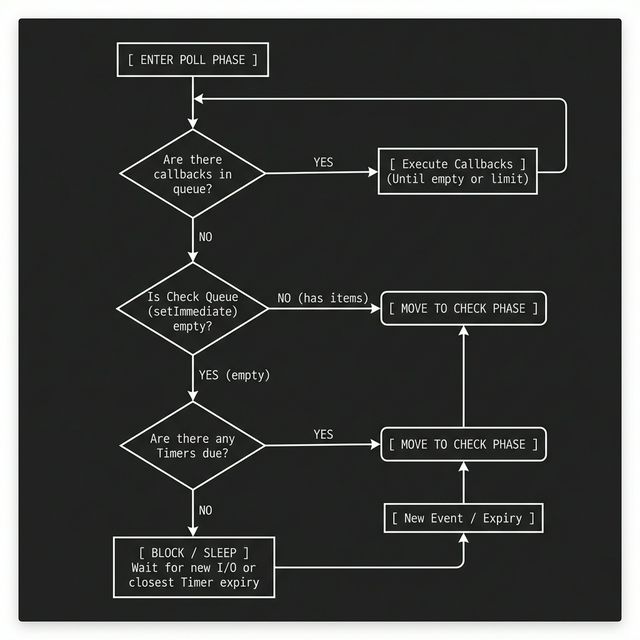
- Poll phase: This is where Node lives most of the time. It deals with incoming i/o callbacks like sockets , dns and filesystem stuff. If poll queue is empty Node may block here waiting for I/O. The Poll phase has two main functions first is calculating the block time , f the queue is empty, Node doesn't just loop infinitely (which would spike your CPU to 100%). It calculates how long it can "sleep" based on the timer closest to expiring.Timers here means a settimeout or setinterval like timeout is happening for a callback then the poll phase sleeps for exactly the amount of time till the timer is due. If a timer is set for 50ms from now, the Poll phase will block for exactly 50ms waiting for I/O, then wake up to move to the Check and Timers phases and its other job is Processing I/O , it processes events from the OS (like a new TCP connection or a file chunk being ready).
Flow In Poll Phase:
- Pending callbacks phase: A small “cleanup / retry” phase for leftover I/O callbacks that couldn’t run earlier by the poll phase due to some exception or shouldn’t be run by the poll phase.
- Close callbacks: For dealing with things like socket.on('close') and cleanup stuff.
Each event loop tick runs through all phases, and in each phase it executes callbacks until that phase’s queue is empty (or a limit is hit). …In browsers this phase based iteration doesn't exist it instead uses a MacroTask queue….
Microtask Queue
The microtask queue is a high-priority queue used for callbacks that must run immediately after the current JavaScript execution completes, but before the event loop proceeds further.
- Microtasks are executed after every callback, regardless of the phase.
- The microtask queue is drained completely before the event loop continues.
- Microtasks can schedule more microtasks, which will also run in the same drain cycle.
- Excessive microtasks can starve the event loop.
- Microtasks examples include : Promise.then, queueMicrotask
Microtasks are not tied to any event loop phase. Microtasks do not extend existing stack frames. Each microtask executes in a new stack frame after the current one completes.
Event Loop Execution Order
For each event loop tick:
- The event loop runs each phase in a fixed order:
*Timers - > Pending Callbacks - > Idle - > Poll - > Check - > Close Callbacks* - Within each phase, Node executes callbacks from that phase’s queue.
- After executing each callback, Node drains all the microtask in the Microtask queue.
- Only after microtasks are fully drained does the event loop continue executing more callbacks in the same phase, or move on to the next phase.
- The loop repeats until there is no remaining work.
Case of process.nextTick:
process.nextTick is not a microtask, and it does not belong to the event loop phases.Node.js maintains a separate nextTick queue that has the highest priority and is processed immediately after the correct operation finishes regardless of the phase.
Execution order if process.nextTick is used in a code:
After the current JavaScript execution completes
                     |
                     V
    process.nextTick queue is drained completely
                     |
                     V
Microtask queue is drained (Promise.then, queueMicrotask)
                     |
                     V
    The event loop proceeds to the next phase.
V8 Engine
So far what we have talked about like event loop call stack etc. all of this is actually part of the engine none of it is actually implemented in JavaScript and this engine of nodejs is the V8 engine. V8 was initially built to enhance JS performance for Chrome Browser , what it did was JIT i.e. Just In Time Compilation which means like let's say in A C++ compiler an executable is made and then u run it that is called Ahead Of Time Compilation but in JIT your code runs the first time using a first non-optimised compiler called Ignition, it compiles the code straight to how it should be read, then, after a few runs, another compiler (the JIT compiler) receives a lot of information on how your code actually behave in most cases and recompiles the code so it's optimised to how it's running at that time.
V8 uses multiple different threads to handle many different things:
- The main thread is the one that fetches, compiles and executes JS code
- Another thread is used for optimisation compiling so the main thread continues the execution while the former is optimising the running code
- A third thread is used only for profilling, which tells the runtime which methods need optimisation
- A few other threads to handle garbage collection
High-level execution flow in V8:
- JavaScript source code is parsed into an Abstract Syntax Tree (AST)
- The AST is compiled into bytecode and executed by Ignition
- Hot code paths are recompiled into optimized machine code by TurboFan
JavaScript execution itself remains single-threaded; background threads assist with optimization, profiling, and garbage collection. While the specific compilation pipeline (Ignition -> TurboFan) is complex, the most important part for us as developers is understanding how V8 optimizes our objects in memory. We will look into that and also see what ASTs are otherwise we would be going too much into compiler engineering which is a whole different field in itself.
Abstract Syntax Trees
An abstract syntax tree is a tree representation of the syntactic structure of a given source code in an abstract form, which means that it could, in theory, be translated to any other language. Each node of the tree denotes a language construct which occurs in the source code. ASTs are fundamental to compilers because they turn source code into a structured tree, removing irrelevant details like comments. This representation lets compilers transform code efficiently and enables tools like IntelliSense to analyze what you’ve written and suggest valid next code. ASTs also make it easy to modify code programmatically, such as replacing all let declarations with const.
We’ve established a solid mental model for Node.js, covering the Event Loop and how V8 optimizes memory with Hidden Classes. We skipped the deep dive into the compiler pipeline (Ignition & TurboFan) because compiler engineering is a massive rabbit hole entirely on its own. Also ,I don't understand compilers well yet. Might get into them in future and write a part 2 of this. Hopefully you had a good read.
Gracias.